


Hey, $mart parents 💡
Bring money lessons home with Greenlight’s $mart Parent newsletter, a quick read with impactful tips — delivered free to your inbox weekly.
Key takeaways
Overview
Skylight Calendar is a popular family-organization device, but it isn't the only way to get a shared calendar, chores, and lists in one place. Families look for alternatives for a few common reasons: Skylight requires an upfront hardware purchase ($160–$600), premium features like meal planning and the Sidekick AI need a Skylight Plus subscription, and it doesn't offer family location sharing or money tools. Here are five strong alternatives and who each one fits.
Best all-in-one hub: Greenlight Family Hub
Best customizable display: Cozyla
Best kid-first routine hub: Hearth
Best for Google smart homes: Google Nest Hub
Best for Alexa households: Amazon Echo Show
5 Skylight alternatives compared
At a glance, here's how Skylight and the five alternatives stack up on the features families weigh first.
Feature | Skylight | Greenlight Family Hub | Cozyla | Hearth | Google Nest Hub | Amazon Echo Show |
|---|---|---|---|---|---|---|
Device price | $160–$600 | $199–$299 | $350–$900 | $699 | $100–$229 | $90–$400 |
Free plan available | ✓ Basic features | ✓ | ✓ Basic tier | ✕ membership required to set up | ✓ no subscription | ✓ no subscription |
Subscription | Skylight Plus, $79/yr | Family Hub+, $99/yr or $9.99/mo | Super $59.99/yr; Essential $79.99/yr (included free on Calendar+) | Required, ~$86/yr | ✕ | ✕ |
Device type | Hardware + app | Hardware + app | Hardware + app | Hardware + app | Hardware + app | Hardware + app |
Shared calendar | ✓ | ✓ | ✓ | ✓ | ✓ Google Calendar | ✓ |
Chores & rewards | ✓ rewards on Plus | ✓ | ✓ | ✓ | ✕ | ✕ |
Calendar sync (Google, Apple, Outlook) | ✓ | ✓ | ✓ | ✓ | Google only | ✓ |
Email-to-calendar import | ✓ on Plus | ✓ on Family Hub+ | ✓ free on Calendar+ | ✕ | ✕ | ✕ |
To-do & grocery lists | ✓ | ✓ | ✓ | ✓ | ✓ | ✓ |
Meal planning | ✓ on Plus | ✕ | ✓ free on Calendar+ | ✓ with membership | ✕ | ✕ |
Photo display | ✓ on Plus | ✓ free, unlimited | ✓ free on Calendar+ | ✕ | ✓ | ✓ |
Voice assistant | Sidekick AI on Plus | ✓ family AI assistant (Family Hub+) | ✓ Google Assistant & Alexa | ✕ | ✓ Google Assistant | ✓ Alexa |
Family location & safety | ✕ | ✓ place alerts, driving reports, crash detection (Family Hub+) | ✕ | ✕ | ✕ | ✕ |
Best for | Simple, calendar-first wall device | Calendar, chores, and safety in one | Most customizable display | Kid-first routine command center | Google smart homes | Alexa households |
Prices are approximate and reflect publicly-disclosed information as of July 2026; they vary by size and promotion and may change.
1. Greenlight Family Hub
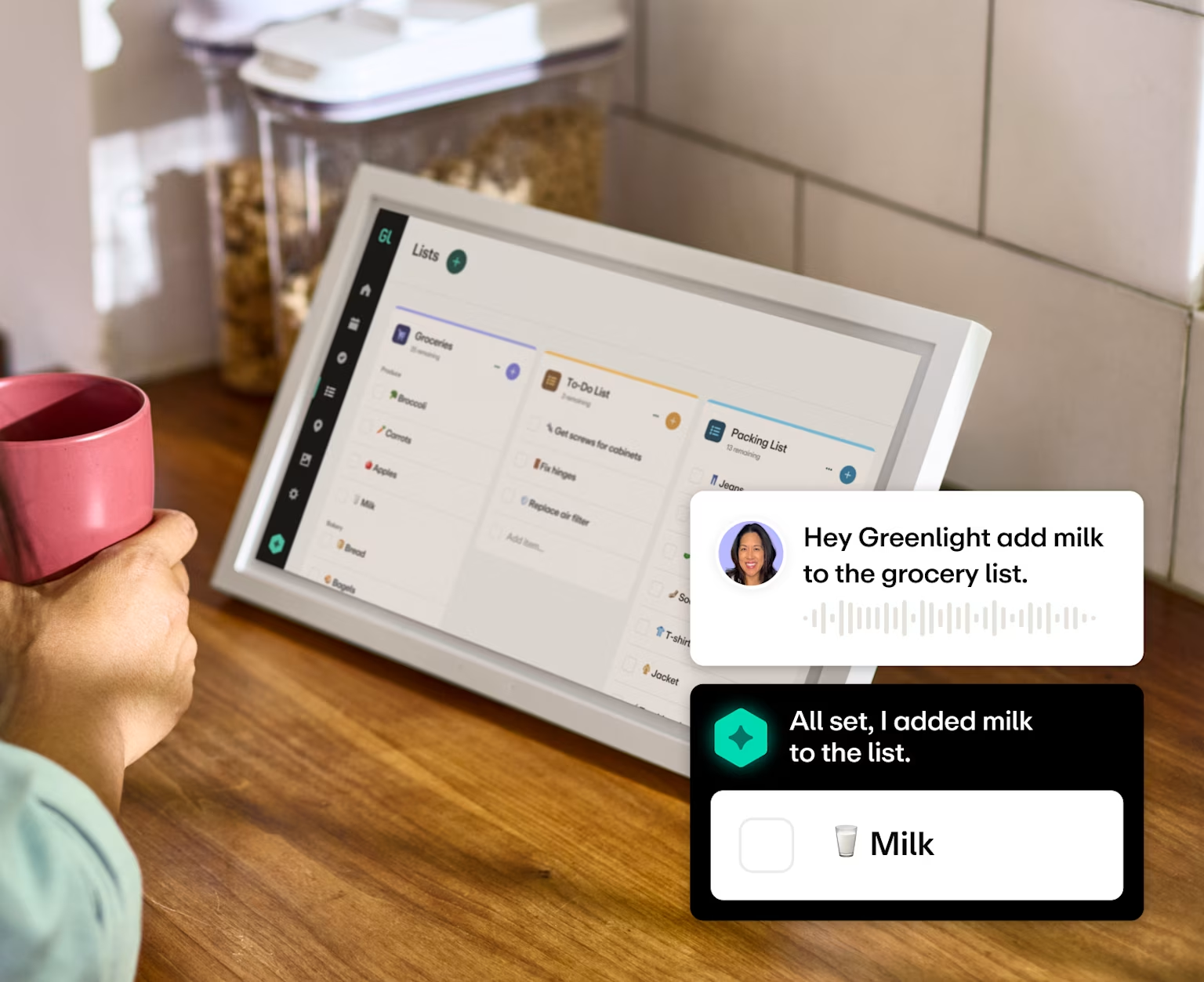
Greenlight Family Hub is the most complete Skylight alternative. It brings the same shared digital calendar, chores, to-dos and grocery lists, and photos on a dedicated device and in a companion app the whole family can use.
The monthly Family Hub+ subscription adds family location sharing with place alerts and a voice AI assistant, though the free plan does offer robust calendar, chores, lists, and photo capabilities. Existing Greenlight users can connect to Greenlight's money features to pay real allowance for completed chores.
Price
10.1″: $199
15.6″: $299
Free plan includes: Calendar, chores, lists, and photo frame display
Best for: Families who want calendar, chores, and safety in one hub
#1 family finance and safety app.
Pros | Cons |
|---|---|
✓ Offers location sharing and crash detection (Family Hub+) ✓ Free plan available ✓ Voice AI assistant and email-to-calendar import (Family Hub+) ✓ Connects to Greenlight's money tools for kids | ✕ No meal planning ✕ Two screen sizes, none as large as Skylight's 27″ Max ✕ AI assistant and safety features require subscription |
How Greenlight Family Hub compares to Skylight
Greenlight Family Hub matches Skylight on calendar, chores, lists, and photos, then goes further: it works beyond a single device, includes more free features, and adds location sharing and money tools Skylight doesn't offer. Skylight's edge is a longer track record and a large 27″ wall option.
2. Cozyla
Cozyla is a family calendar display built around shared visibility and fast setup with a clean interface the whole household can pick up, not just the parent who did the research. It covers the scheduling basics well, plus meal planning, grocery lists, chore rewards, and its own Cozyla Agent assistant.
A free Basic tier comes with every device, and on Calendar+ models the Essential feature set is included for free, though the top-tier assistant and Art Gallery sit on a separate Super plan.
Price
15.6″: $349.99
24″: $699.99
32″: $899.99
Free plan includes: Calendar, to-dos, chores, and notes on every device; Calendar+ models add rewards, habits, meal planning, photo screensaver, and Smart Import at no cost
Best for: Families who want to customize what's on the screen
Pros | Cons |
|---|---|
✓ Runs Android apps and drag-and-drop widgets — the most customizable display here ✓ Calendar, chores, meal planning, and lists in one place ✓ Built-in AI voice assistant and photo display | ✕ Highest upfront price for the large 32″ model ✕ AI assistant tools and Art Gallery require subscription ✕ No location sharing or safety features |
How Cozyla compares to Skylight
Both hide their better features behind a paid plan, but Cozyla's larger models come with those features already unlocked, so you pay once and you're done. With Skylight, chore rewards, meal planning, and email import cost $79 a year on top of the device, no matter which one you buy. The tradeoff: Skylight's hardware is far cheaper upfront.
3. Hearth
Hearth is a premium family calendar display in the same category as Skylight, built around a large touchscreen for shared schedules, chores, and routines. It targets families who want a high-end, calendar-first wall device and don't mind a higher price and subscription.
Price: $699 device plus a membership
Free plan includes: N/A. Membership is required to set the device up
Best for: Families who want a kid-first routine command center
Pros | Cons |
|---|---|
✓ Large, premium always-on display ✓ Strong focus on shared calendar and routines ✓ Polished, design-forward hardware | ✕ Among the most expensive options ✕ Requires an ongoing subscription ✕ No location sharing or money tools |
How Hearth compares to Skylight
Skylight is calendar-first: cheaper hardware, more sizes, and a free basic tier. Hearth is kid-first — routines, streaks, and daily check-ins on one 27″ screen — but costs $699 plus a required ~$86/yr membership. Choose Hearth to build kids' independence; choose Skylight if you mainly need the family schedule on the wall.
4. Google Nest Hub
Google Nest Hub is a smart display that shows your Google Calendar, plays media, and controls smart-home devices. It's inexpensive and versatile, but it's a general-purpose assistant screen rather than a family-scheduling tool, so shared chores and lists are more limited than on Skylight.
Price: $100–$229 depending on screen size
Free plan includes: Everything — no subscription required
Best for: Households already using Google and smart-home devices
Pros | Cons |
|---|---|
✓ Inexpensive and widely available ✓ Great for Google Calendar, media, and smart-home control ✓ Voice assistant built in | ✕ Not a dedicated family-organization tool ✕ Limited shared chores and lists ✕ Requires a Google account and works best with Google Calendar and Nest devices |
How Google Nest Hub compares to Skylight
Nest Hub is cheaper and more of a smart-home all-rounder, while Skylight is purpose-built for family scheduling with richer chores and lists. Pick Nest Hub if smart-home control matters most; pick Skylight if family organization is the priority.
5. Amazon Echo Show
Amazon Echo Show is Alexa's smart display line, spanning small to large screens. Like Nest Hub, it shows calendars and photos and controls smart-home devices, and it can display a shared family calendar — but it's an Alexa device first and a family organizer second.
Price: $90–$400 depending on screen size
Free plan includes: Everything — no subscription required
Best for: Households already invested in Alexa
Pros | Cons |
|---|---|
✓ Range of sizes and price points ✓ Alexa voice, media, and smart-home control ✓ Doubles as a photo display | ✕ Family scheduling is secondary to Alexa ✕ Shared chores and lists are limited ✕ Requires an Amazon account and works best with Alexa-compatible devices |
How Amazon Echo Show compares to Skylight
Echo Show is a flexible Alexa display rather than a family-calendar device, so it wins on smart-home versatility but trails Skylight on dedicated scheduling, chores, and lists. Choose it if you're already an Alexa household.
How to choose the right hub for your family
Ask yourself a few questions before deciding on a central hub.
Who uses it besides you? If your kids are too young for phones, a shared screen they can walk up to matters more than any app feature.
What's free and what costs extra? Most of these have a device price plus a subscription. Skylight charges extra for chores and photos; Greenlight includes them free; Hearth requires a membership just to set up. Run the math for your household.
Do you want safety features? Location sharing and place alerts narrow the field fast — Greenlight Family Hub is the only option here that offers them.
How much setup are you willing to do? Echo Show and Nest Hub can approximate a family hub, but you're stitching together features that weren't designed to work together.
Does it grow with your family? Young kids check off chores; tweens take on more; teens drive and share locations. Look for something that still fits in three years.
Who has access to your data? Some smart displays are built on advertising businesses, and household interactions can feed targeting profiles. Worth asking of anything that lives in your kitchen.
Which Skylight alternative is right for your family?
Skylight is a solid family display with a clean setup, but the moment chores and photos hit the paywall, the value equation gets harder to justify. The right pick comes down to what you need the screen to do — and what you're willing to pay for on an ongoing basis.
Want chores and safety in one place? Choose Greenlight Family Hub. It's the only display here that adds location sharing, place alerts, and crash detection to a family calendar, and its free plan already covers calendar, chores, lists, and unlimited photos.
Want full on-screen customization? Cozyla runs full Android apps and drag-and-drop widgets on the largest displays — the most flexible option, at the highest hardware price.
Have younger kids you're building habits with? Hearth's routines, streaks, and daily check-ins are the most kid-focused approach. Just be sure to budget for the required membership on top of the device.
Already living in Google or Alexa? Nest Hub and Echo Show are the cheapest way to get a shared calendar on a screen, but expect to give up chore tracking and family safety features.
FAQ
What is the best alternative to Skylight Calendar?
For most families the strongest all-in-one alternative is Greenlight Family Hub — the same shared calendar, chores, lists, and photos across a device plus web and mobile, with family location sharing and a capable free plan. Cozyla is a straightforward calendar display, and Google Nest Hub or Amazon Echo Show suit smart-home households.
Is there a free alternative to Skylight?
Several. Skylight itself works without a subscription for calendar, chores, and lists, and Cozyla includes a free Basic tier. Among purpose-built family displays, Greenlight Family Hub has the most complete free plan — calendar, chores, lists, and unlimited photos at no monthly cost. Hearth is the exception: a membership is required just to set the device up.
What is the difference between Skylight and Greenlight Family Hub?
Skylight is a dedicated calendar device you buy once, with an optional yearly subscription. Greenlight Family Hub offers the same organization on a device plus mobile app, with a free plan, family location sharing, and optional money tools for kids.
Which Skylight alternative is cheapest overall?
Google Nest Hub is the lowest upfront cost at around $100 with no required subscription, followed by Amazon Echo Show. Among purpose-built family displays, Greenlight Family Hub is the cheapest to run over time because its core calendar, chores, lists, and photo features are free.
Which Skylight alternative is best for smart homes?
Google Nest Hub and Amazon Echo Show are smart displays that show calendars and control smart-home devices, so they suit households already using Google or Alexa — though they're less focused on family scheduling than Skylight or Greenlight Family Hub.
Methodology. We compared Skylight alternatives on the factors families weigh most when choosing a family-organization tool: price and format (app vs. device), calendar and sync, chores and lists, meal planning, photos, family location sharing, AI features, and any money tools. Details are drawn from each provider's publicly-disclosed materials as of July 2026; prices are approximate and vary by size and promotion. Products change often — confirm current details with each provider before deciding.
Skylight, Cozyla, Hearth, Google Nest Hub, and Amazon Echo Show are trademarks of their respective owners. All product and company names are trademarks of their respective holders and use here does not imply affiliation or endorsement.
Greenlight Family Hub pricing and features reflect information available as of July 2026 and may change. This article is for educational purposes only and does not constitute financial advice.
The Greenlight Family Hub requires WiFi connectivity and is available for use with all Greenlight plans. Some features require a subscription. See Terms for more details.
© 2026 Greenlight Financial Technology, Inc. All Rights Reserved. The Greenlight card is issued by Community Federal Savings Bank, member FDIC, pursuant to license by Mastercard International.
Share

