

Capital One Teen Checking vs. Greenlight: Which is best for teens?
Share

Hey, $mart parents 💡
Bring money lessons home with Greenlight’s $mart Parent newsletter, a quick read with impactful tips — delivered free to your inbox weekly.
Key takeaways
Parents have many options today when it comes to checking accounts and debit cards that help teach kids and teens better money habits, but sometimes, having so many options can make it challenging to figure out which is best. We compare how Capital One Money Teen Checking and Greenlight differ across pricing, parental controls, safety, earning, education, and investing so families can match each product to their needs.
Greenlight vs Capital One Money Teen Checking overview
Greenlight and Capital One Money Teen Checking offer features that help parents teach their teens about financial independence, including teen debit cards, the ability to set savings goals, and parental account access. Greenlight adds category-specific parental controls, investing, chore management, and family safety features that Capital One Money Teen Checking does not include.
Greenlight vs. Capital One Money Teen Checking
Feature | Capital One Money Teen Checking | Greenlight |
|---|---|---|
Pricing | No monthly service fees | Starts at $5.99/mo for up to 5 kids |
Data sharing | May share data with third parties | Not shared with third parties |
Age requirement to open | Ages 6+ | No restriction |
Savings goals | ✓ Yes | ✓ Yes |
Allowance payments | ✓ Yes — parent-initiated transfers | ✓ Yes — automated, can be chore-linked |
Category-specific parental controls | ✕ No | ✓ Yes |
Up to 6% on savings¹ | ✕ No | ✓ Yes |
Up to 1% cash back² | ✕ No | ✓ Yes |
Investing for families | ✕ No | ✓ Yes |
Custom debit card | ✕ No | ✓ Yes |
Chores management | ✕ No | ✓ Yes |
Customizable spending limits | ✕ No | ✓ Yes |
Family location sharing & SOS alerts⁴ | ✕ No | ✓ Yes |
Driving reports, alerts & crash detection⁴ | ✕ No | ✓ Yes |
Pricing and features are accurate as of July 2026 and may change; check each provider for current details. See numbered disclosures at the end of this article for details on savings, cash back, and safety features.
Capital One Money Teen Checking at a glance
Capital One Money Teen Checking is an online-only checking account for teens and kids ages 6 and above, designed to teach them about money management. It's a joint checking account with a parent or guardian, through which kids can access their account in the Capital One app, deposit checks, set savings goals, and make purchases with a debit card.
Features
Debit card for kids ages 6 and up
Access to Capital One's mobile app for account management
Interest-earning on any balance amount
Savings goals
Parent allowance transfers
Parent account monitoring
Fraud protection
Pros and cons
Pros | Cons |
|---|---|
✓ No monthly fees ✓ Simple, familiar checking account structure (joint with a parent) ✓ Basic parental oversight: allowance transfers, account monitoring, fraud protection | ✕ No investing options for teens ✕ Limited educational tools — just savings goals and spending limits ✕ No category- or store-level parental controls |
Greenlight at a glance
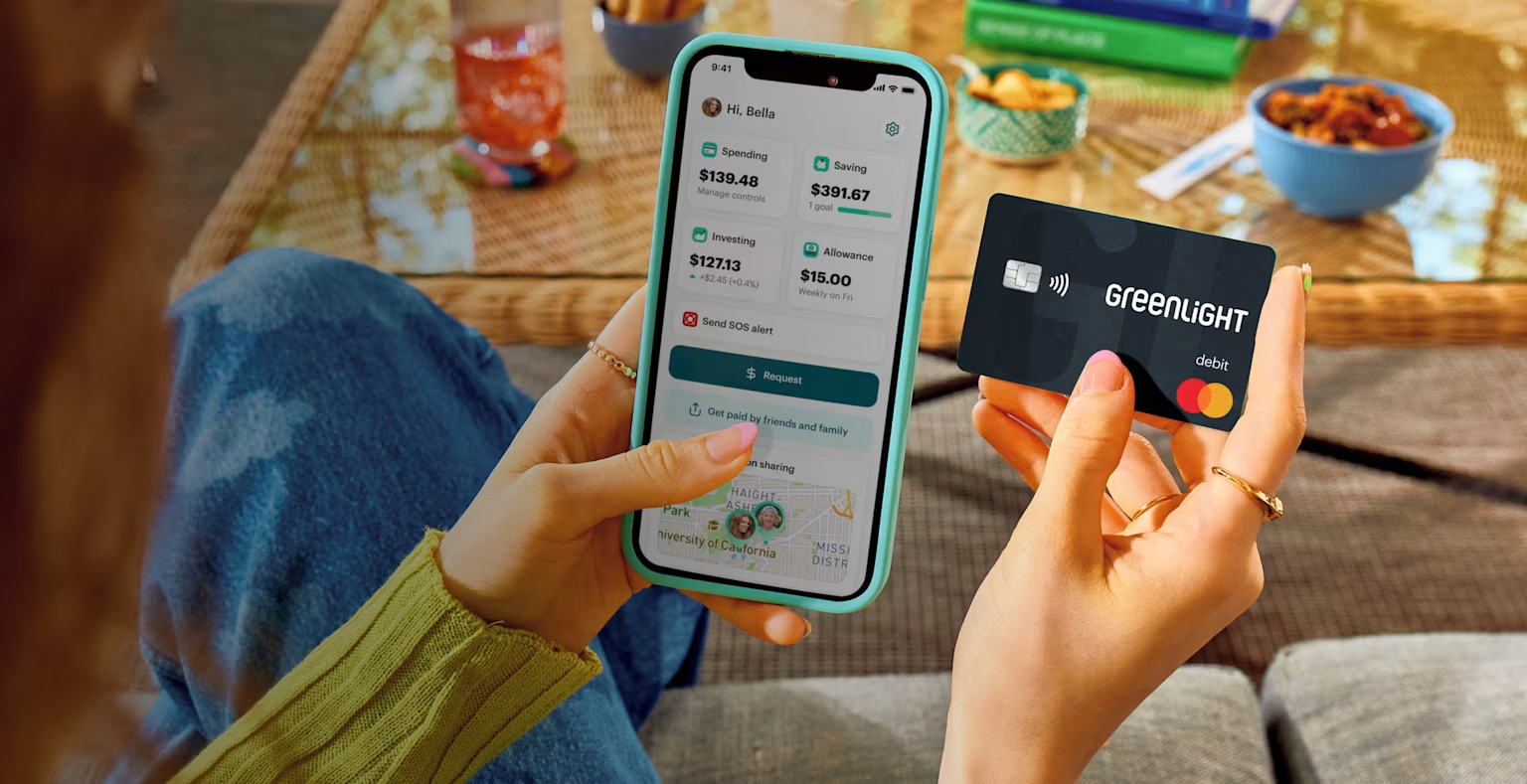
Greenlight is a money management app and debit card that helps families guide their teens toward making smart financial decisions. It offers four plans: Core, Max, Infinity, and Family Shield, each adding progressively more features.
All plans provide essential features like personalized debit cards for up to five kids, tools for tracking chores and allowance, savings rewards¹, and investing insights. Families who choose the Greenlight Max, Infinity, or Family Shield plans unlock extra benefits, including up to 1% cash back on purchases², identity theft protection⁵, purchase and phone⁴ coverage, family location sharing³, crash detection, driving insights, and more.
Features
Category-specific parental controls
Up to 6% on savings¹
Up to 1% cash back²
Investing for kids and parents
Chores and allowance management
Financial literacy games
Family safety features like location sharing, crash detection, SOS alerts, and driving reports³
Quickly send money
Identity theft⁵, phone⁴, and purchase protection
Pros and cons
Pros | Cons |
|---|---|
✓ Category-specific and store-level parental controls ✓ Built-in investing tools for both parents and kids/teens ✓ Robust safety features: crash detection, SOS alerts, location sharing, driving reports³ ✓ In-app financial literacy game (Level Up) | ✕ Requires monthly subscription ✕ Investing for kids requires a higher-tier plan ✕ More complex than a basic checking account |
Pricing
When you compare Capital One Money Teen Checking and Greenlight in terms of pricing, it's important to consider what you're getting for the cost.
Capital One Money Teen Checking is free, making it a solid choice for families who are simply looking for a basic, budget-friendly bank account that allows teens to manage their money with minimal parental oversight.
Greenlight starts at $5.99/month and offers advanced features for families who want an all-in-one money management and safety app. Greenlight provides features like parental controls, chore tracking, savings goals, and real-time notifications as part of its Core plan, while the higher-tier plans include extras like up to 1% cash back², investing, teen driving insights³, and more.
Capital One Money Teen Checking pricing
No monthly fees
Greenlight pricing
Greenlight Core: $5.99 per month
Greenlight Max: $10.98 per month
Greenlight Infinity: $15.98 per month
Greenlight Family Shield: $19.98 per month
Pricing accurate as of July 2026 and subject to change.
Who wins?
If cost alone is your deciding factor, Capital One Money Teen Checking is the better option.
If you're looking for extra features like category-specific parental controls, cash back, savings rewards, and investing tools, Greenlight is the better choice.
Parental controls
Both the Capital One Money Teen Checking account and Greenlight give parents the ability to monitor account activity, but Greenlight offers a deeper level of parental control features like store- and category-specific controls. Here's how they compare.
Parental control | Capital One Money Teen Checking | Greenlight |
|---|---|---|
Parent approval for peer-to-peer transfers | ✓ Yes | ✓ Yes |
Transaction monitoring | ✓ Yes | ✓ Yes |
Store-level controls | ✕ No | ✓ Yes |
Category-specific controls | ✕ No | ✓ Yes |
Customizable spending limits | ✕ No | ✓ Yes |
Real-time notifications | ✓ Yes | ✓ Yes |
Features accurate as of July 2026 and subject to change.
Who wins?
Greenlight offers granularity with store-level and category-specific restrictions, flexible spending limits, and transfer approvals. Capital One Money Teen Checking covers the basics with transaction monitoring, alerts, and allowance transfers.
Safety and security
Safety is a primary concern for every parent considering a debit card for their child. While Greenlight and Capital One Money Teen Checking both prioritize security, specific features differ significantly. Both provide fraud protection, 24/7 account monitoring, and mobile alerts; Greenlight layers on additional safety and security features designed to provide additional peace of mind for parents.
Safety feature | Capital One Money Teen Checking | Greenlight |
|---|---|---|
Fraud protection§ | ✓ Yes | ✓ Yes |
24/7 support | ✓ Yes | ✓ Yes |
Mobile/real-time alerts | ✓ Yes | ✓ Yes |
Identity theft⁵, purchase & phone protection⁴ | ✕ No | ✓ Yes |
Crash detection with 911 dispatch³ | ✕ No | ✓ Yes |
SOS alerts³ | ✕ No | ✓ Yes |
Family location sharing³ | ✕ No | ✓ Yes |
Driving reports & real-time trip alerts³ | ✕ No | ✓ Yes |
Shares your child's data with third parties | ✓ Yes | ✕ No |
Features accurate as of July 2026 and subject to change.
Per its published privacy policy, Capital One may share certain customer data with third parties (see Capital One's privacy disclosures for specifics). Greenlight states it does not sell or share children's personal data with third parties for marketing. Families with privacy concerns should review each provider's current privacy policy.
Who wins?
Capital One Money Teen Checking includes fraud protection, 24/7 account monitoring, and mobile alerts. Greenlight includes those account protections plus crash detection with 911 dispatch, SOS alerts, family location sharing, driving reports³, and identity theft⁵, purchase, and phone protection⁴.
Earning and saving
Capital One Money Teen Checking earns interest on any balance, but the rate is much lower than Greenlight's rewards, and it doesn't offer cash back or additional savings incentives.
Earning & saving feature | Capital One Money Teen Checking | Greenlight |
|---|---|---|
Savings goals & progress tracking | ✓ Yes | ✓ Yes |
Rewards on savings | ✓ Yes | ✓ Yes¹ |
Automated allowance | ✓ Yes | ✓ Yes |
Direct deposit | ✓ Yes | ✓ Yes |
Cash back on purchases | ✕ No | ✓ Yes — 1%² |
Chore tracking & chore-linked allowance | ✕ No | ✓ Yes |
Features accurate as of July 2026 and subject to change.
Who wins?
For maximizing earning potential, Greenlight offers savings rewards up to 6%¹ plus optional cash back, while Capital One earns standard account interest only.
Educational features
Providing access to an account is only one part of teaching teens about financial literacy. While Capital One offers basic tools focused on savings goals and spending limits, Greenlight adds an in-app financial literacy game. Here's how Greenlight and Capital One Money Teen Checking measure up when it comes to learning about money.
Educational feature | Capital One Money Teen Checking | Greenlight |
|---|---|---|
Savings goals as a teaching tool | ✓ Yes | ✓ Yes |
In-app financial literacy game | ✕ No | ✓ Yes — Level Up™ |
Structured lessons from financial education experts | ✕ No | ✓ Yes |
Free lesson plans for teachers | ✕ No | ✓ Yes |
Hands-on investing education | ✕ No | ✓ Yes — Max plan and above |
Features accurate as of July 2026 and subject to change.
Capital One Money Teen Checking educational features
Capital One Money Teen Checking has in-app features that can help teach teens about money management, including savings goals and spending limits.
Greenlight educational features
With Greenlight Level Up™, an engaging in-app game, teens and kids can develop essential financial literacy skills through interactive challenges created by certified financial education experts. This educational tool is available across all of Greenlight's plans at no extra cost.
Greenlight also supports financial learning with free financial education lesson plans for school teachers and a dedicated blog, The Learning Center, offering practical tips and insights for families to better understand money management and personal finance.
Who wins?
Choose Capital One if a simple savings-goal tool is enough. But if you want structured financial literacy content for kids, Greenlight may be a better option.
Bonus feature: investing
If teaching your teen about investing is a priority, Greenlight is the better option. Capital One Money Teen Checking doesn't offer any investing options, while Greenlight includes tools that allow teens to learn the basics of investing hands-on with parental oversight**.
The Greenlight Core plan includes a lite Invest for Parents feature, which allows parents to invest in a curated selection of 10 ETFs with no hidden fees and a low starting amount of just $1.
For families that upgrade to Greenlight Max, Infinity, or Family Shield, kids and teens can dive into Investing for Kids, a hands-on platform where they can do the following:
Research 4,000+ stocks and ETFs
Watch AI-powered video lessons that explain how a company actually works before they invest
Request a buy or sell — then a parent approves it with a tap
The verdict: which one is right for your family?
Choose Capital One Money Teen Checking if you want a fee-free account for an older teen who's ready for real-world banking basics, and you don't need chore tracking, investing, or advanced parental controls.
Choose Greenlight if you want to combine money management, financial education, and family safety features in one app, and you're comfortable paying a monthly fee for that added flexibility.
FAQ
Should I get Greenlight or Capital One Money Teen Checking?
It depends on your family's priorities. If you're looking for a free, basic banking experience, Capital One Money Teen Checking is a solid choice. If you want a more comprehensive financial platform with parental controls, investing features, and educational resources, Greenlight is the better option.
What is the difference between Greenlight and Capital One Money Teen Checking?
The most significant differences can be found in the features. Capital One Money Teen Checking provides free banking services, while Greenlight offers several plans that start at $5.99/mo and offer a robust suite of financial tools, including investing for kids, category-specific parental controls, chores and allowance tracking, and financial education.
Does Capital One Money Teen Checking offer safety and parental controls?
Capital One Money Teen Checking allows parents to monitor transactions and set up alerts but doesn't offer the same level of control as Greenlight, which includes real-time approvals, spending limits, and category-specific parental controls.
¹Greenlight Core families can earn 2% per annum, Greenlight Max families can earn 3% per annum, Greenlight Infinity families can earn 5% per annum, and Greenlight Family Shield families can earn 6% per annum on an average daily savings balance of up to $5,000 per family. To qualify, the Primary Account must be in Good Standing and have a verified ACH funding account. See Greenlight Terms of Service for details. Subject to change at any time.
2 Greenlight Max and Infinity families can earn 1% cash back on spending monthly. To qualify, the Primary Account must be in Good Standing and have a verified ACH funding account. See Greenlight Terms of Service for details. Subject to change at any time.
3 Requires mobile data or a WiFi connection, and access to sensory and motion data from cell phone to utilize safety features including family location sharing and driving alerts and reports. Messaging and data rates and other terms may apply.
4 Provided by Virginia Surety Company, Inc., cell phone protection is not available to residents of New York.
5Insurance offered by Acrisure, LLC is provided by ACE American Insurance Company and its U.S.-based Chubb underwriting company affiliates. www.chubb.com. Additional details can be viewed here. See link for policy information. Insurance Products are not insured by the FDIC or any federal government agency and are not a deposit or other obligation of, or guaranteed by, any bank or bank affiliate.
§Premium monitoring services are offered by Array.
The Greenlight® prepaid card is issued by Community Federal Savings Bank, member FDIC, pursuant to license by Mastercard International.
**© 2025 Greenlight Investment Advisors, LLC, an SEC Registered Investment Advisor provides investment advisory services to its clients. Investing involves risk and may include the loss of principal. Investments are not FDIC-insured, are not a deposit, and may lose value.
Requires the downloading of the Greenlight App and acceptance of Greenlight Level Up™ Program Terms. Does not require subscription to Greenlight prepaid debit card plan.
Share

